


Paying more for managed WordPress hosting doesn’t always mean you’re getting a better deal. That’s one reason I wanted to take a closer look at WPX vs Pressable before recommending either one.
WPX offers free site migrations and WordPress-focused support, while Pressable is backed by Automattic, the company behind WordPress.com. Both are worth considering, but which one gives you more for your money?
I compared their pricing, speed, features, and customer support to see where each host does better and which one I recommend for your website.
WPX vs Pressable 2026: Side-by-Side Comparison
Let’s compare WPX and Pressable on pricing, speed, features, and customer support to see which hosting provider offers better value for your money.
| Feature | WPX | Pressable |
|---|---|---|
| Founded | 2013 (named WPX in 2016) | 2010 (started as ZippyKid) |
| Based in | Sofia, Bulgaria | San Antonio, Texas |
| Owned by | Terry Kyle and Georgi Petrov (independent) | Automattic (bought in 2016) |
| Hosting type | Managed WordPress and WooCommerce | Managed WordPress and WooCommerce |
| Servers | Own servers, | Automattic WP Cloud |
| Server software | LiteSpeed Enterprise, MariaDB, OPcache | WP Cloud, primary + secondary, auto-failover |
| Data centers | 3: Chicago, London, Sydney | 4: Los Angeles, Dallas, Washington DC, Amsterdam |
| Failover | No published second origin | Secondary server in another region |
| CDN | XDN, 43+ endpoints | 28 PoPs |
| Uptime | 99.95% | 100% uptime SLA |
| Current Status | NA | pressablestatus.com |
| Caching | LiteSpeed Cache + OPcache. Redis on Elite, Agency, and Woo plans | Edge cache + object cache + OPcache |
| PHP workers | 9 to 300 (plan based) | 5 Dedicated PHP Workers (5 vCPUs) Per Site |
| Site migration | Free unlimited transfer by team | Free unlimited transfer by team |
| Staging | One-click. Uses a site slot (not on Woo) | On every plan. Extra staging doesn’t count. Selective push |
| Automatic updates | Manual in wp-admin | Core is automatic. Safe plugin updates are $3/site |
| Control panel | WPX panel, rebuilt in 2025 | MyPressable, updated in 2026 |
| Website builder | No | No |
| One-click install | Yes | Yes |
| Free email | Yes (except starter plan) | No. Titan at $3.50 per inbox/mo |
| Email storage | Shared with plan disk | 10 GB per Titan inbox |
| WooCommerce | Separate Woo plans (starting from $23.33/mo), Redis included. Better for smaller stores | No separate plan. Hourly database backups, Woo-certified support |
| Free SSL | Yes – Let’s Encrypt | Yes – Let’s Encrypt, automatic, HTTP to HTTPS |
| Malware | Daily scans, free removal | Jetpack Security, real-time scan |
| Firewall | Managed WAF | WP Cloud WAF, WordPress rules |
| DDoS | Origin mitigation + XDN anycast | Anycast edge, rate limiting, Defensive Mode |
| Backups | All plans | All plans |
| Backup frequency | Daily. Personal backup on demand | Files daily, database hourly |
| Backup retention | 28 days. Personal backup kept 24 hours | 30 days. On-demand copy kept 30 days |
| SSH / SFTP | SFTP on all plans. SSH more limited | SSH on all plans. No root. 8-hour session, 1 GB RAM cap |
| Git | SSH or SFTP only | GitHub integration + public API |
| WP-CLI | If SSH is on | SSH, MCP, and API |
| Cron | Mostly WP-Cron. No crontab screen | Dashboard cron: hourly, daily, twice daily, weekly |
| Support | 24/7 chat and tickets. No phone | 24/7 Intercom chat and email. No phone |
| Support speed | 15 seconds, They fix it for you | First reply often in 2 minutes, WordPress and Woo specialists |
| Starting price | $17.99/mo (monthly), $14.99/mo (annual), $11.99/mo (5-year term) | $25/mo (monthly), $20.83/mo (annual) |
| Entry Plan Features | 1 Site, 10 GB Storage, 100 GB Bandwidth | 1 Site, 20 GB Storage, 30,000 Visits/mo |
| Renewal Price | No change | No change |
| Money-back guarantee | 30 days | 30 days |
| Free domain | No | No |
About WPX and Pressable
WPX

WPX started in 2013 and has become a popular choice among WordPress website owners. It handles the technical side of hosting, so you don’t have to spend your time managing servers.
One thing I like about WPX is that it offers free website migrations, its own XDN CDN, and WordPress-focused customer support. If you’re running a blog, affiliate website, or online business, these features can save you time when managing your site.
WPX also uses LiteSpeed Enterprise servers, which support fast website delivery.
Pressable
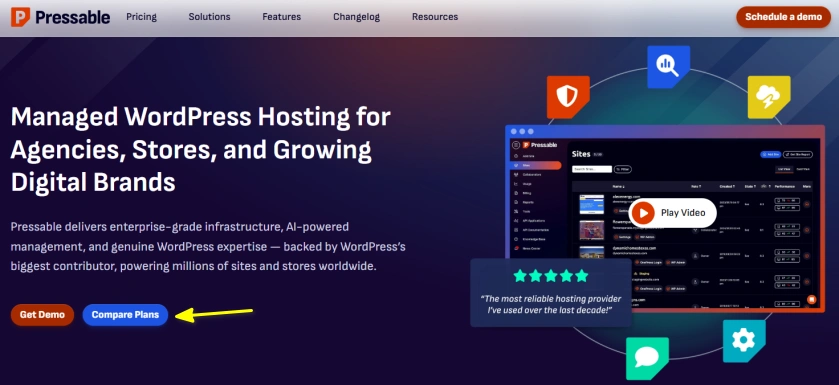
Pressable has been around since 2010, when it launched as ZippyKid. It is now owned by Automattic, the company behind WordPress.com and WooCommerce.
Pressable runs on Automattic’s WP Cloud platform and handles server management for you. You also get features such as automatic scaling, edge caching, and geo-redundancy to help your website handle traffic and stay available.
If you manage several client websites or run a growing WordPress business, Pressable is worth considering.
But does it offer better value than WPX? Let’s look at their plans and features to find out.
Performance and Speed
WPX and Pressable both offer fast WordPress hosting, but they differ in their server technology, CDN, and traffic handling.
WPX Performance
WPX uses LiteSpeed Enterprise servers and its own XDN CDN, with more than 43 global locations. It also offers MariaDB, OPcache, and free speed optimization.
Here’s what you get with WPX:
- LiteSpeed Enterprise servers for handling WordPress requests.
- XDN CDN with 43+ global locations to serve content closer to visitors.
- MariaDB and OPcache to help WordPress process requests efficiently.
- Free speed optimization if your website needs some extra help.
WPX is a good fit for blogs and affiliate websites. You get the main speed features, and you can ask its support team for help if your website needs performance improvements.
WPX Speed Test

I tested WPX with a blank WordPress website using GTmetrix. The test returned a TTFB of 569 ms, meaning the server took around 0.57 seconds to start responding to the request.
The test also recorded a 98% performance score, 899 ms Largest Contentful Paint (LCP), and 1.1 seconds fully loaded time. Since this was a blank website, these results show the hosting performance without the extra load of a fully built website with content and plugins.
Pressable Performance
Pressable runs on Automattic’s WP Cloud platform and offers built-in caching and a global Edge Cache network with 28 points of presence.
Its main performance features are:
- Edge Cache to serve cached pages and static files closer to visitors.
- Page caching to reduce repeated page generation.
- Object caching and OPcache to reduce processing time.
- Automatic scaling to handle increases in traffic.
Pressable has an advantage when traffic changes quickly. If a promotion brings hundreds or thousands of visitors to your website, its automatic scaling can help handle the extra demand.
Which One Has Better Performance?
WPX offers a larger CDN network, with 43+ locations compared with Pressable’s 28 points of presence. However, the number of locations alone doesn’t determine which host loads your website faster.
Pressable has a useful advantage with automatic scaling, while WPX offers free speed optimization.
- For a regular blog or affiliate website, I recommend WPX if you want help with speed improvements.
- For a website with unpredictable traffic, Pressable is worth considering for its automatic scaling.
Ease of Use
Both WPX and Pressable make it easy to manage WordPress websites without dealing with server administration.
WPX Ease of Use
WPX has a custom dashboard for managing websites, backups, email accounts, and migrations.
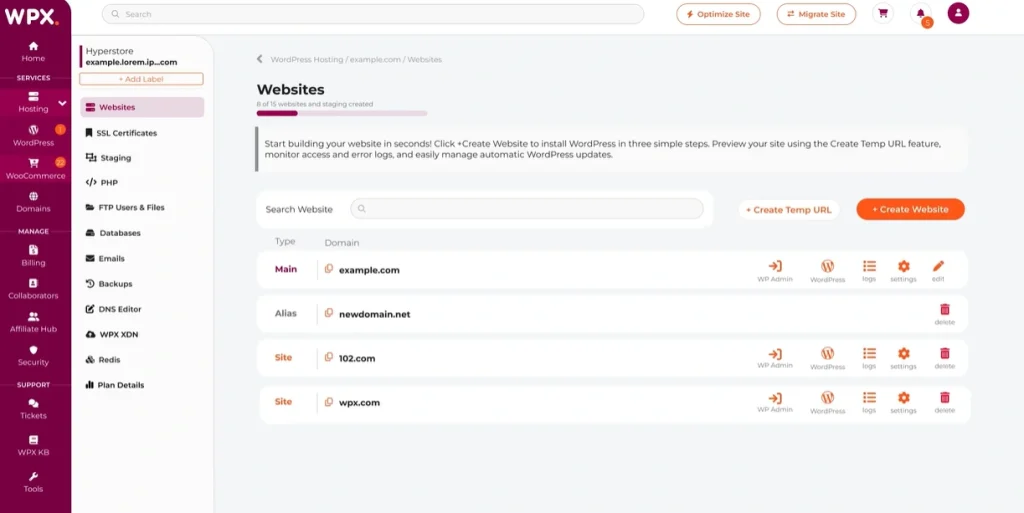
- Install and manage WordPress websites.
- Create professional email accounts with your hosting plan.
- Access backups and restore your website when needed.
- Request free website migrations.
- Contact support for help with hosting issues.
I like that WPX provides email hosting (except starter plan) and free migrations alongside its hosting plans. You don’t need to arrange separate services for these tasks.
Pressable Ease of Use
Pressable uses its MyPressable dashboard to manage WordPress installations and hosting settings.

- Manage multiple WordPress websites from one dashboard.
- Access automatic backups and restore points.
- Create staging sites to test changes before publishing them.
- Manage team members and client access.
- Monitor website resources and performance.
Pressable is a good choice for agencies and developers who manage several client websites. Staging and team management make everyday website work easier.
Which One Is Easier to Use?
Both are easy to manage, but they suit slightly different needs.
- I recommend WPX if you want email hosting, free migrations, and straightforward website management.
- Pressable is the better choice if you manage client websites and need staging and team collaboration tools.
Keep in mind that Pressable doesn’t include email hosting with its standard plans, but you can purchase a separate Titan email plan starting at $3.50 per inbox per month.
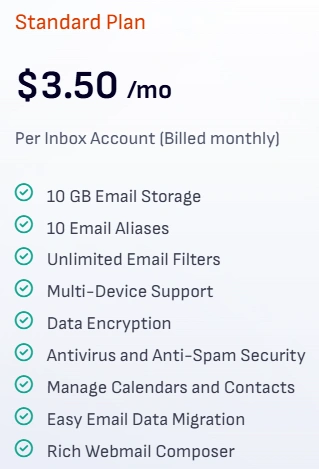
Alternatively, you can use an external email hosting service such as Google Workspace or Zoho Mail.
Data Centers and CDN
WPX and Pressable both use global CDN networks to deliver website content to visitors. The main difference is their server locations and the size of their CDN networks.
WPX Data Centers and CDN
WPX has data centers in three locations:
- London, UK
- Chicago, USA
- Sydney, Australia
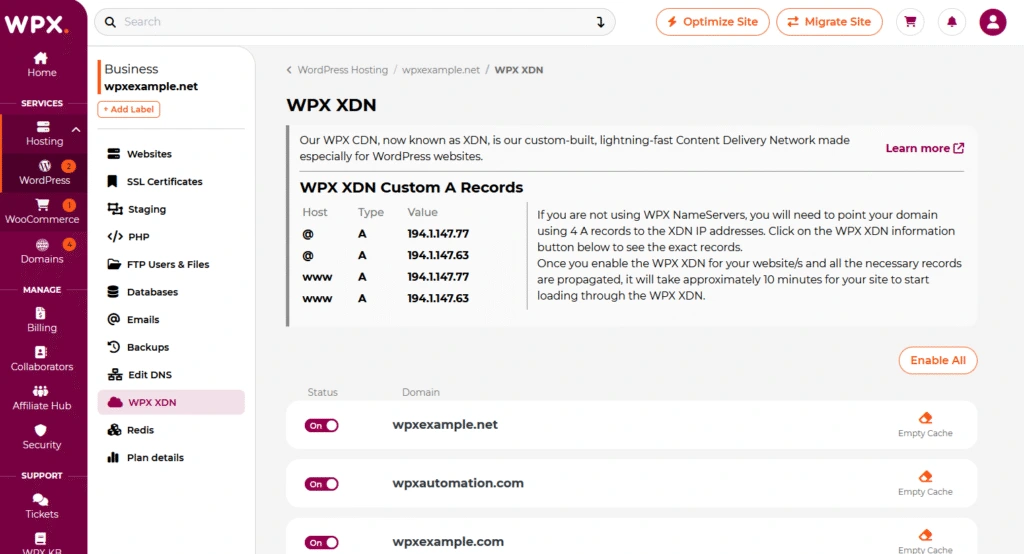
WPX also provides its XDN CDN with 43+ global endpoints at no extra cost. It helps deliver cached content closer to visitors, even when your main server is far away.
Pressable Data Centers and CDN
Pressable has data centers in four locations:
- Amsterdam, Netherlands
- Washington, D.C., USA
- Los Angeles, USA
- Dallas, USA
Pressable’s Edge Cache network has 28 points of presence across six continents. Edge Cache is available on all plans, and Pressable also offers automatic failover to help maintain website availability if the primary server becomes unreachable.
Which Has Better Data Centers and CDN?
WPX has more CDN endpoints, while Pressable offers more main data center locations and automatic failover.
- I recommend WPX if you prefer its XDN network and three server location options.
- Pressable is worth considering if automatic failover is a priority for your website.
Security and Backups
WPX and Pressable both handle website security and automatic backups, but Pressable has an advantage when it comes to backup frequency.
WPX Security
WPX provides several security features with its hosting plans, so you don’t have to pay separately for basic website protection.
- Daily malware scans: WPX scans your website every day to detect malware.
- Free malware removal: If your website gets infected, the WPX security team cleans it up without charging an extra fee.
- Web Application Firewall (WAF): Blocks malicious requests and helps protect your website against common attacks.
- DDoS protection: Helps protect your website against attacks designed to overwhelm it with traffic.
- Brute-force protection: Helps prevent repeated login attempts from unauthorized users.
- Free SSL certificates: Secures connections between your website and visitors.
- Two-factor authentication: Adds another layer of protection to your hosting account.
The free malware cleanup is a useful benefit. If your website gets hacked, you can ask WPX to remove the malicious code instead of paying a separate malware removal service.
WPX Backups
WPX automatically backs up your websites every day and stores those backups on a separate server.
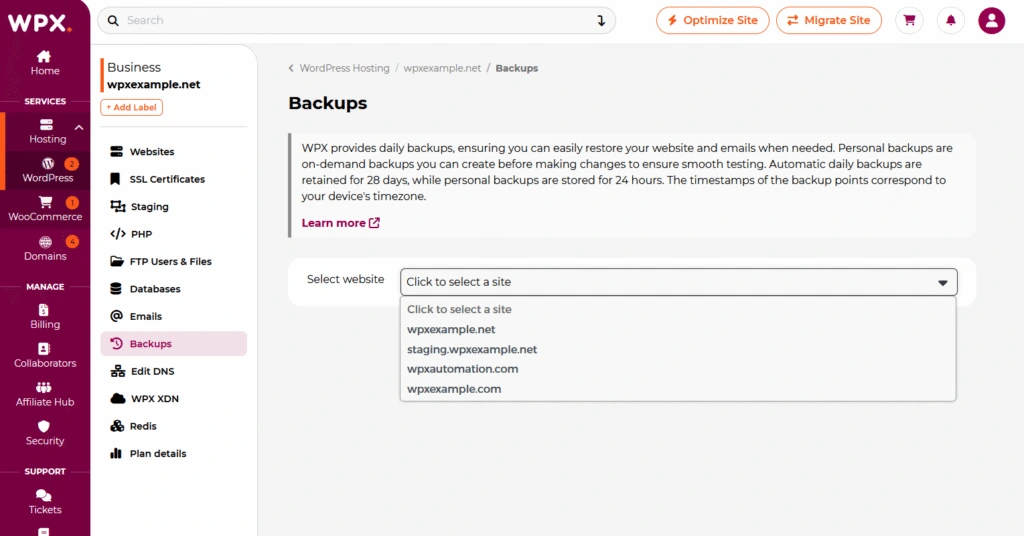
- Backup frequency: Daily.
- Retention period: 28 days.
- Manual backups: Create a personal backup before making major website changes.
- Restoration: Restore an earlier version through the WPX control panel.
One limitation is that personal backups are kept for only 24 hours. If you want to keep a separate copy for longer, download it before it expires.
Pressable Security
Pressable provides website protection through its hosting infrastructure and Jetpack Security tools.
- Malware scanning: Jetpack Security scans for malware and other security threats.
- Malware cleanup: Pressable provides support if your website gets compromised.
- Web Application Firewall: Helps block malicious traffic and common web attacks.
- Brute-force protection: Helps prevent unauthorized login attempts.
- Free SSL certificates: Encrypts connections between your website and visitors.
- Automatic failover: Switches to another server if the primary server experiences certain failures.
Pressable also provides a Jetpack Security license with its hosting plans, giving you access to additional security and backup tools.
Pressable Backups
Pressable gives you more frequent database backups than WPX, which can be useful for websites that receive regular updates.
- Website files: Backed up daily.
- Database: Backed up hourly.
- Retention period: At least 30 days for standard hosting backups.
- On-demand backups: Create a backup before updating plugins, changing themes, or making other major changes.
- Real-time backups: Jetpack Security provides additional backup protection.
The hourly database backups are particularly useful for WooCommerce stores, membership websites, and blogs that receive frequent comments or registrations. If something goes wrong, you have more recent database restore points available.
Which Is Better for Security and Backups?
I recommend Pressable if your website receives frequent orders, registrations, or other database updates. Its hourly database backups and additional Jetpack Security tools give you more recovery options.
WPX is a strong choice for blogs and affiliate websites, especially if you value daily malware scans, free malware cleanup, and straightforward backup restoration.
Developer Tools
WPX and Pressable both offer tools for managing WordPress websites, but Pressable has more options for developers who work with code and Git.
WPX Developer Tools
WPX provides a set of tools for building, testing, and managing WordPress websites without needing a complicated server setup.
- Staging environment: Create a copy of your live website to test plugins, themes, and design changes before publishing them.
- One-click WordPress installation: Set up a new WordPress website without manually installing the software.
- File Manager and FTP: Access your website files to make changes or troubleshoot problems.
- phpMyAdmin: Manage your WordPress database through a web interface.
- SSL installation: Install an SSL certificate for your website through the hosting panel.
WPX’s staging tool is useful when you’re redesigning a website or testing a plugin update. You can work on the copy first and move the changes to your live site when they’re ready.
Keep in mind that WPX staging has limits: your database must be under 1 GB, and your website files must stay within 5 GB.
Pressable Developer Tools
Pressable offers more command-line and deployment tools, making it a better fit for developers who want more control over their workflow.
- SSH and SFTP: Access your website files and run supported commands through a terminal.
- WP-CLI: Manage WordPress through the command line, including supported site maintenance tasks.
- Git integration: Connect a GitHub repository to manage code deployments.
- Staging environments: Test changes separately from your live website.
- PHP and error logs: Choose your PHP version and check logs when troubleshooting website problems.
- Developer API: Automate supported hosting management tasks.
Pressable’s SSH, WP-CLI, and Git tools are particularly useful if you build custom WordPress themes or plugins, manage client websites, or regularly deploy code changes.
Which Has Better Developer Tools?
I recommend Pressable for developers who work with Git, SSH, and WP-CLI. These tools give you more options for managing code and handling development tasks.
WPX is a good choice if you mainly need staging, file access, database management, and straightforward WordPress administration. For advanced development workflows, Pressable has the advantage.
Customer Support
WPX and Pressable both offer 24/7 customer support, but neither provides phone support. If you need help, you’ll have to contact their teams online.
WPX Customer Support
WPX provides 24/7 support through live chat and a ticket system.
- Live chat: WPX says its team responds within 30 seconds on average.
- Technical help: Get assistance with hosting errors, website migrations, SSL, DNS, and other hosting tasks.
- Free fixes: WPX’s Fixed For You Guarantee covers many hosting-related problems at no extra cost.
- Malware cleanup: The support team helps remove malware if your website gets infected.
What I like about WPX is that its team can fix many problems for you instead of sending you instructions to follow. However, it won’t rewrite broken plugins or fix custom code.
Pressable Customer Support
Pressable offers 24/7 support from WordPress specialists through its online support system.
- Live chat: Get help with hosting and WordPress problems.
- Technical assistance: The team can help with migrations, security issues, and performance problems.
- WordPress expertise: Support staff can assist with WordPress-specific troubleshooting.
- Response time: Pressable has an average response time of under four minutes.
Pressable is a good option if you want help from people who work with WordPress every day. Its team can also help troubleshoot performance and security problems.
Which Has Better Customer Support?
I recommend WPX if you want fast live chat responses and hands-on help with common hosting issues. Its stated average response time of 30 seconds is quicker than Pressable’s reported response time of under four minutes.
Pressable is also a strong choice, particularly if you need help with WordPress-specific problems. Both offer round-the-clock support, but WPX has the edge for response speed and its Fixed For You Guarantee.
Pricing
WPX costs less at the entry level, but there’s a catch: its lowest price requires a five-year prepayment. Pressable costs more per month, but you can pay annually instead of committing for several years.
| Feature | WPX | Pressable |
|---|---|---|
| Lowest starting price | $11.99/mo (5-year billing) | $20.83/mo (annual billing) |
| Monthly billing | $17.99/mo | $25/mo |
| Annual billing | $14.99/mo | $20.83/mo |
| Renewal Price | No change | No change |
| Entry plan websites | 1 | 1 |
| Entry plan storage | 10 GB | 20 GB |
| Traffic limits | Unlimited visitors | 30,000 visits/mo |
| Money-back guarantee | 30 days | 30 days |
Which Hosting Provider Offers Better Value?
WPX is the cheaper option if you want to keep hosting costs down. Its Starter plan costs $11.99 per month with five-year billing, while Pressable’s Signature 1 plan costs $20.83 per month with annual billing.
I recommend WPX if you’re running a blog or affiliate website and want to pay less for hosting. Pressable is worth considering if you prefer annual billing, need more storage, and want a clear monthly visitor allowance.
Pros and Cons
WPX Pros and Cons
Pros
- Free website migrations with hands-on support.
- Free malware removal and daily backups.
- LiteSpeed Enterprise servers and its own XDN CDN.
- Free email hosting with your hosting plan.
- 24/7 live chat support with quick response times.
Cons
- The lowest prices require a five-year prepayment.
- Only three main data center locations.
- No phone support.
- Staging environments have storage and database size limits.
Pressable Pros and Cons
Pros
- Built on Automattic’s WP Cloud platform.
- Daily file backups and hourly database backups.
- Automatic scaling to handle traffic increases.
- Staging sites, SSH, WP-CLI, and Git integration.
- 24/7 support from WordPress specialists.
Cons
- Higher starting price than WPX.
- No email hosting with its plans.
- Monthly visitor limits depend on your plan.
- No phone support.
Which One Should You Choose?
I recommend WPX for bloggers and affiliate marketers who want affordable hosting with free migrations, email hosting, and malware removal.
Choose Pressable if you manage client websites, need hourly database backups, or want developer tools such as SSH, WP-CLI, and Git.
For most content websites, WPX is my recommendation. Pressable is worth the higher price if your website needs its more advanced development and traffic-management features.
Best Alternatives to WPX and Pressable
If WPX or Pressable doesn’t fit your needs, there are several other managed WordPress hosts worth considering.
Here are a few Pressable and WPX alternatives with different pricing and feature sets.
| Hosting | Starting Price (Annual) | Sites | Storage | Best For |
|---|---|---|---|---|
| ScalaHosting | $14.95/mo | Multiple | 50 GB NVMe | Managed cloud VPS |
| Kinsta | $30/mo | 1 | 15 GB | High-performance WordPress |
| WP Engine | $30/mo | 1 | 10 GB | Business websites and blogs |
ScalaHosting
ScalaHosting offers managed cloud VPS hosting with dedicated CPU and RAM resources. Its entry Managed Cloud VPS currently starts at $14.95/month and includes 2 CPU cores, 2 GB RAM, and 50 GB NVMe storage.
It’s a good alternative if you want more server resources and control than a standard managed WordPress plan. ScalaHosting also includes SPanel, automatic backups, free migrations, WordPress staging, WP-CLI, SSH, and built-in security tools.
Check this too: ScalaHosting vs WPX
Kinsta
Kinsta starts at $30/month for a single WordPress site. The entry plan includes 15 GB of storage, 15 GB of server bandwidth, 125 GB of CDN bandwidth, unlimited free migrations, and 14-day backup retention.
Kinsta is aimed at businesses, blogs, online stores, agencies, and other sites that want managed WordPress hosting with developer tools and performance monitoring.
Check these too: Kinsta vs WPX and Kinsta vs Pressable
WP Engine
WP Engine starts at $30/month for its Startup plan. It supports one site with 10 GB of storage, 25,000 visits per month, and 75GB of monthly bandwidth.
WP Engine includes managed WordPress and PHP updates, automatic backups, one-click staging, EverCache, a global CDN, security features, and 24/7 WordPress support. It’s aimed at bloggers, businesses, agencies, and higher-traffic WordPress sites.
Check these too: WP Engine vs WPX and WP Engine vs Pressable
FAQs: WPX vs Pressable
Is WPX worth the price?
WPX is worth considering if you want managed WordPress hosting with email hosting, free migrations, and malware removal. Its lowest monthly rate requires a five-year prepayment, so make sure you’re comfortable with that commitment.
Does Pressable charge based on website traffic?
Yes. Pressable’s plans have monthly visit limits. For example, its Signature 1 plan supports 30,000 visits per month. Check the visit allowance before choosing a plan for a growing website.
Can I host multiple websites on WPX and Pressable?
Yes. Both offer plans for multiple websites. WPX’s Business plan supports up to five websites, while Pressable’s Signature 3 plan supports five websites.
Can I move my website from WPX to Pressable?
Yes. You can migrate your WordPress website from WPX to Pressable. Pressable offers migration assistance, so you can ask its team about moving your site before changing hosts.
Which is better for an agency, WPX or Pressable?
Pressable is worth a closer look if you manage client websites. Its staging environments, Git integration, SSH access, and WP-CLI support are useful when you’re developing and maintaining WordPress sites for clients.
Does WPX include email hosting?
WPX offers email hosting, but the Starter plan doesn’t include it.
Can I test website changes before publishing them?
Yes. Both WPX and Pressable offer staging environments where you can test plugin updates, theme changes, and other modifications before applying them to your live website.
Final Verdict
WPX and Pressable are both capable WordPress hosts, but my overall pick is WPX for its lower entry price and free malware cleanup.
Pressable is worth choosing if you need its developer tools or more frequent database backups. However, its higher starting price makes it harder to justify for a straightforward blog.
Before signing up, consider how long you’re willing to commit to a hosting plan. WPX’s lowest price requires five years of prepayment, while Pressable offers annual billing.